
Device and Account
Hubbox Device and Account Management Guide
The System Management panel is the core interface for monitoring your device’s identity, maintaining precise time synchronization for industrial logging, and ensuring administrative security through credential management.
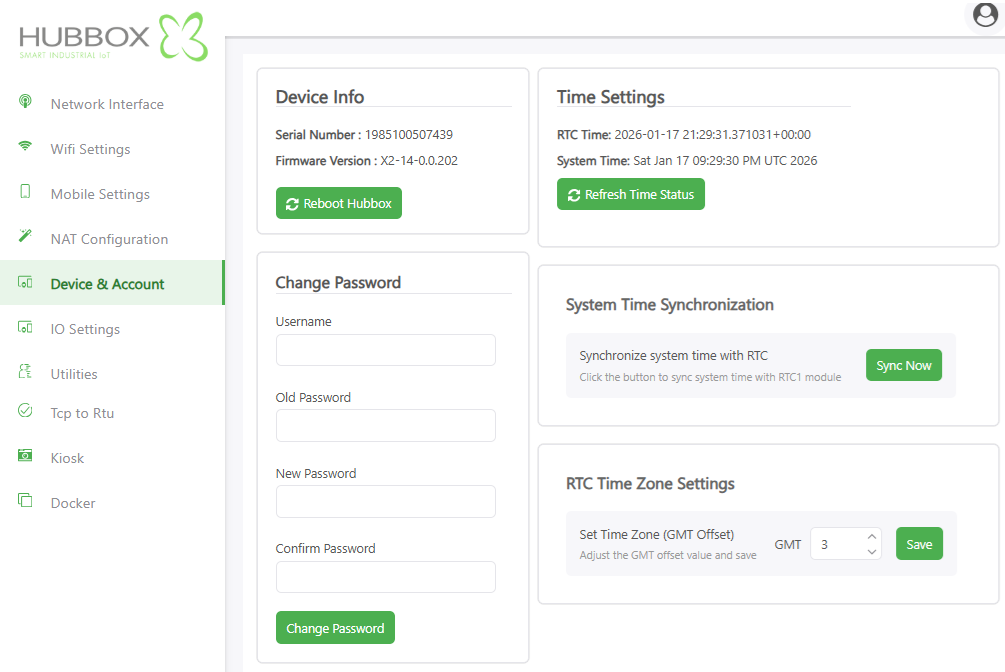
1. Device Information & Maintenance
This section provides critical identification data required for support and lifecycle management:
- Serial Number: The unique hardware identifier. Note Always provide this ID when contacting Hubbox technical support.
- Firmware Version: Displays the current software build (e.g.,
X2-14-0.0.202). Keeping this updated ensures compatibility with the latest cloud features. - Reboot Hubbox System Restart: Performs a soft reset of the device. Use this to apply deep configuration changes or resolve minor software inconsistencies.
2. Time Settings and RTC Synchronization
In industrial IoT, accurate timestamps are vital for data integrity and log correlation.
- RTC & System Time: Monitors the alignment between the hardware Real-Time Clock (battery-backed) and the software system clock.
- Sync Now: Forces an immediate synchronization between the RTC module and the system time to prevent clock drift.
- RTC Time Zone Settings: Configures the local GMT offset (e.g.,
GMT+3). Correct regional settings ensure that scheduled tasks and logs align with local operations.
Synchronization Tip: If the device has internet access, it typically syncs with NTP servers. The RTC serves as the primary time reference when the device is operating offline in remote field locations.
3. Account Security & Password Management
Maintain strict access control by updating default credentials:
- Username: Identify the account you wish to modify.
- Old & New Password: Verify current access before establishing new, complex credentials.
- Change Password Commit: Updates the local authentication database immediately.
Administrative Best Practices
- Credential Hygiene: Never retain the default
hubbox/hubboxcredentials after the initial installation. - Encryption Standards: Hubbox utilizes 2048-Bit RSA Encryption. Ensure your network environment does not strip SSL/TLS headers which could compromise this tunnel.
- Firmware Policy: Regular firmware audits are recommended. Security patches are frequently released to protect against emerging industrial cyber threats.
For advanced security configuration and firmware binaries: www.hubbox.io

