
Docker Settings
Docker Service Management User Guide
Your HUBBOX device allows you to run powerful applications such as Node-RED and Portainer using container technology, thanks to its built-in Docker infrastructure. This enables you to create customized automation scenarios and data visualization dashboards directly on the device.
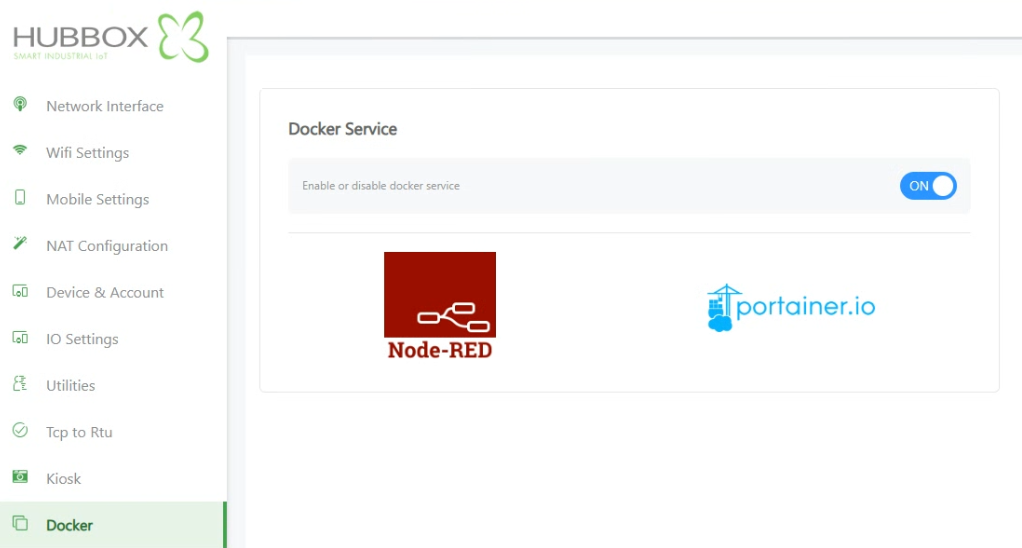
1. Enabling Docker Service
The main service must be active for the Docker containers on your device to function:
- Service Control: You can enable or disable the service using the toggle switch under the "Docker Service" heading to the ON or OFF position.
- Automatic Startup: Once the service is activated, the pre-installed Node-RED and Portainer containers will automatically start running in the background with the device's default configuration.
2. Accessing and Redirecting to Applications
When the Docker service is active, you can access the application interfaces directly via the HUBBOX's local IP address:
- Quick Access: Clicking on the Node-RED or Portainer.io logos on the page will automatically redirect your browser to the application's respective port using the HUBBOX default IP.
- Node-RED Access: Used to reach the flow-based programming interface (Default: device-ip-address:1880).
- Portainer Access: Used to reach the container management and status monitoring panel (Default: device-ip-address:9443).
3. Integrated Application Features
These two tools integrated within HUBBOX provide the following advantages for your industrial processes:
- Node-RED: Allows you to collect data from different industrial protocols (Modbus, OPC UA, MQTT, etc.), process it, and visualize it via the Dashboard.
- Portainer: Enables you to manage the Docker infrastructure through a visual web interface without needing technical commands, allowing you to check logs and monitor resource usage.
Access Tip: If the pages do not open when clicking the logos, ensure the Docker service is set to ON and that your computer is on the same network as the device.
Security and Performance Notes
- Resource Management: Docker services can consume CPU and RAM. It is recommended to monitor the device's general performance from the "Utilities" tab when creating complex Node-RED flows.
- Access Security: Node-RED and Portainer interfaces may come without passwords by default. Ensure you set a strong user password within these applications after the initial setup.
- Container Status: You can use the Portainer interface for operations such as stopping or restarting containers.
For technical assistance regarding Docker and application integrations: www.hubbox.io

