
Utilities Settings
HUBBOX Utilities (Tools and Diagnostics) Guide
The Utilities menu is essential for verifying network reachability to local field devices (PLCs, HMIs) or remote cloud servers, as well as benchmarking your current bandwidth capacity.
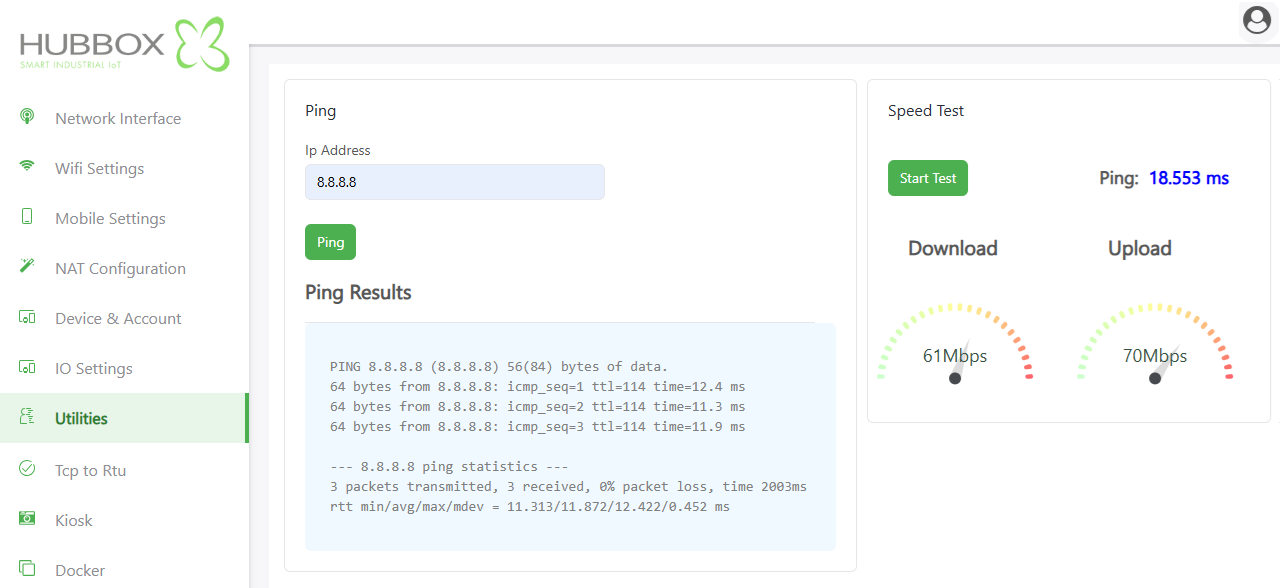
1. Ping Test (Reachability Analysis)
This tool checks if a target device is active on the network and measures communication latency.
- IP Address: Enter the internal IP of your field equipment (e.g.,
192.168.1.50) or a public DNS (e.g.,8.8.8.8). - Ping Button: Initiates the ICMP packet request.
- Ping Results: Displays the response time in milliseconds (ms).
- Latency (Time): Lower values indicate a more stable, responsive connection.
- Packet Loss: Ideally should be 0%. High loss indicates cabling or interference issues.
Technical Tip: If the Ping test fails for a local device, double-check that the target device's gateway is set to the HUBBOX LAN IP.
2. Speed Test (Bandwidth Benchmark)
Measures the actual data throughput of your internet connection to ensure it meets the requirements for remote monitoring.
- Download: The speed at which data is received from the internet (Mbps). High download speed is vital for firmware updates and receiving large logs.
- Upload: The speed at which the HUBBOX sends data to the cloud (Mbps). This is critical for real-time data streaming and remote desktop (VNC/HMI) performance.
- Ping (ms): The server response time. Values under 100ms are excellent for industrial remote access.
Important: Running a speed test consumes temporary bandwidth. Avoid running this test during active critical production cycles to prevent data congestion.
For further troubleshooting or advanced network diagnostics: www.hubbox.io

