
Hotspot Settings
Hotspot Settings User Guide
The Hotspot configuration menu allows your HUBBOX device to act as a local wireless access point. This feature enables your field devices to connect to the internet or local network wirelessly through the HUBBOX.
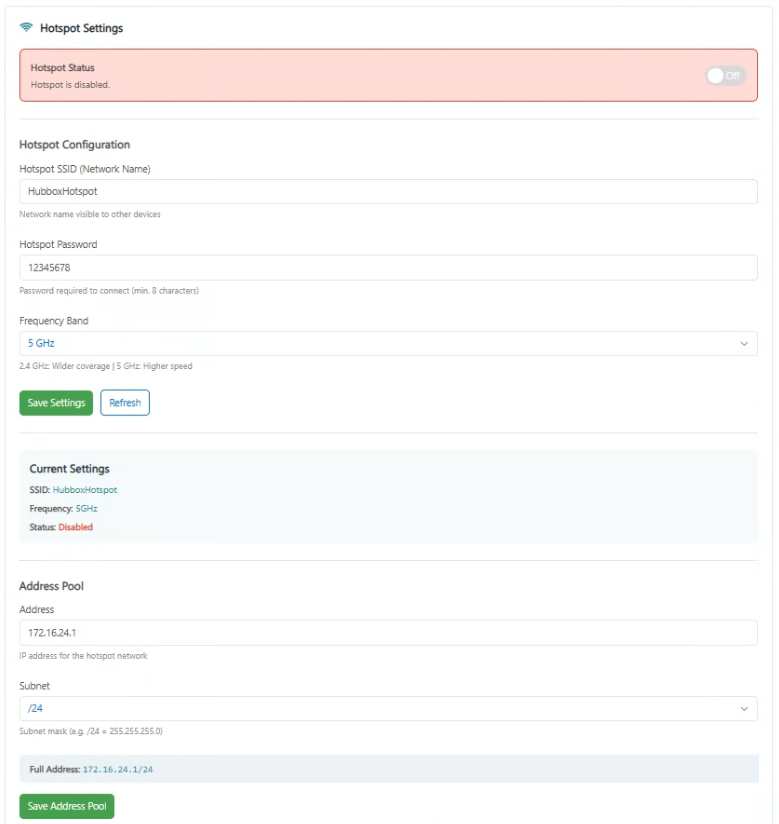
1. Hotspot Status and Activation
The status panel at the top of the screen indicates whether the hotspot service is currently active and allows for quick toggling:
- Hotspot Status: Displays the current state. If the panel is red, it indicates "Hotspot is disabled".
- On / Off Toggle Switch: Located in the top right corner of the status bar to enable or disable the service.
2. Hotspot Configuration
Define the credentials for the wireless network that your device will broadcast:
- Hotspot SSID: Enter the network name that will be visible to other devices (e.g.,
HubboxHotspot). - Hotspot Password: Set a security key for the connection (minimum 8 characters).
- Frequency Band: Choose between 2.4 GHz for wider coverage or 5 GHz for higher speeds.
Click Save Settings to apply your configuration.
3. Address Pool and Network Management
This section configures the IP range and gateway settings for all connected wireless clients:
- Address: The gateway IP for the hotspot network (e.g.,
172.16.24.1). - Subnet: Select the subnet mask (e.g.,
/24for 255.255.255.0) to define the network size. - Full Address: Verification field showing the combined network notation (e.g., 172.16.24.1/24).
Current Settings Verification: You can monitor active parameters such as the SSID, Frequency, and Status (Enabled/Disabled) in real-time through the "Current Settings" summary panel.
Operational Guidelines
- Security Recommendation: Always change the default hotspot password to a unique, strong key to prevent unauthorized network access.
- IP Conflict Prevention: Ensure that the Address Pool IP range does not overlap with the existing WAN or LAN settings of the device.
- Enclosure & Signal: If the HUBBOX is installed inside a metal cabinet, signal strength will be severely reduced. Use an external antenna for stable hotspot performance.
For technical assistance regarding hotspot configurations: www.hubbox.io

