
Modbus TCP to RTU Converter
TCP to RTU (Modbus Gateway) User Guide
The Modbus Gateway panel allows your Hubbox device to act as a bridge, converting Ethernet-based Modbus TCP packets into serial-based Modbus RTU signals. This enables modern network access to legacy serial equipment such as PLCs, VFDs, and industrial sensors.
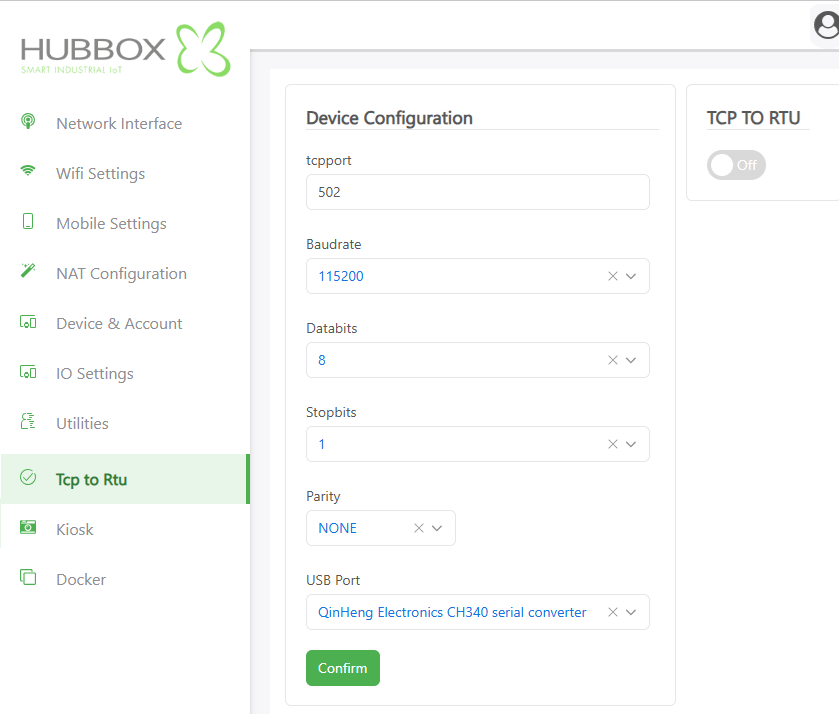
1. Serial Port & Protocol Configuration
For reliable serial communication, the parameters below must exactly match the physical settings of the device connected to the Hubbox serial port:
- TCP Port: The network port used to listen for incoming Modbus TCP requests. Default: 502
- Baudrate: The communication speed of the serial line. Common industrial values include
9600,19200, or115200. - Data Bits / Stop Bits: Define the structure of the data frame. Standard industrial configurations usually utilize
8 Data Bitsand1 Stop Bit. - Parity: An error-checking bit. Options include
NONE,EVEN, orODDdepending on your slave device requirements. - USB Port: Identifies the hardware path of the connected USB-to-Serial converter (e.g.,
QinHeng Electronics CH340).
2. Service Activation
Once the physical parameters are defined, the gateway service must be initialized:
- TCP TO RTU Switch On/Off: This toggle switch controls the active state of the conversion service.
- Confirm: Click this button to commit changes to the system memory and restart the gateway service with the new parameters.
Pro Tip: All data packets handled by the gateway are processed with high-precision timestamps supported by the internal RTC (Real Time Clock), ensuring accurate sequence-of-events recording.
Industrial System Advantages
- Global Reliability: Field-proven in over 70 countries.
- Cybersecurity: All relayed traffic is encapsulated within 2048-Bit RSA Encryption tunnels.
- Versatility: Fully compatible with diverse RTU devices including flow sensors, pressure transmitters, energy meters, and PLCs.
Critical Warning: Incorrect serial parameters (Baudrate, Parity, etc.) will result in "Timeout" or "CRC Error" responses. Always consult your field device's technical manual before finalizing these values.
For advanced Modbus mapping or troubleshooting support: www.hubbox.io

