
KIOSK Mode
Kiosk Mode User Guide
Hubbox Kiosk Mode enables the automatic execution of a specific web interface—such as an operational dashboard—in full-screen mode on any connected display (HMI, industrial monitor, etc.). This feature is designed to restrict field operators to authorized control screens only, preventing unauthorized system access.
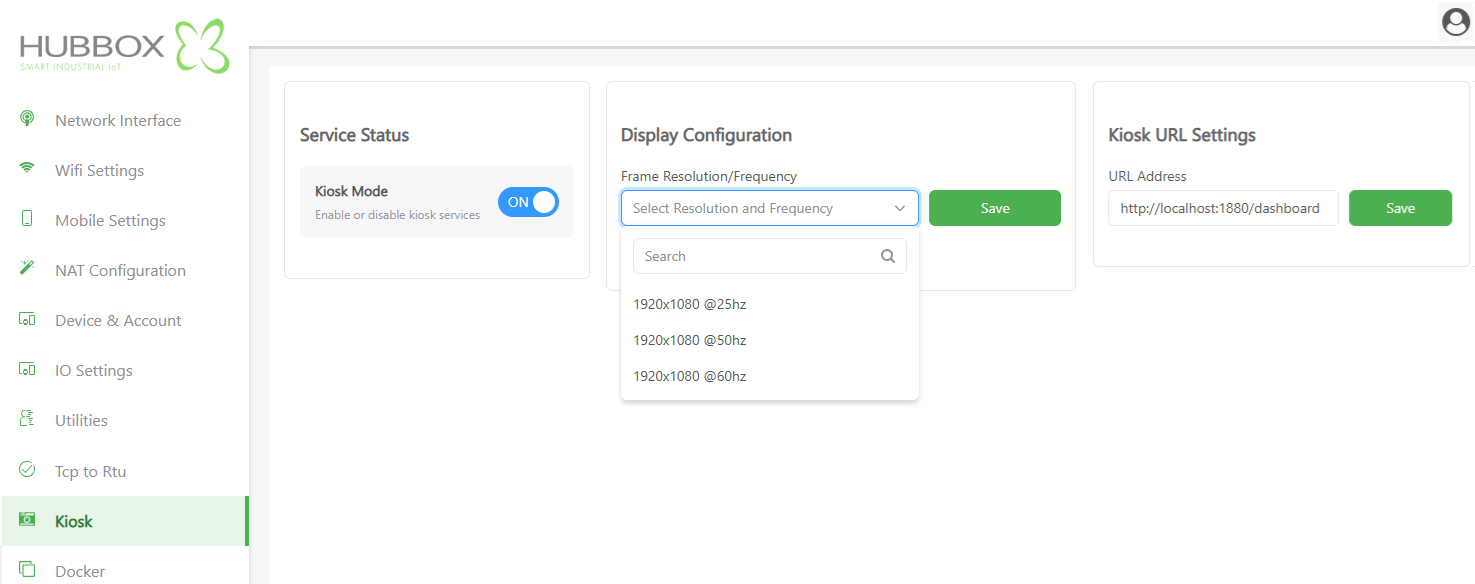
1. Service Status
This global toggle controls the state of the local display server:
- Kiosk Mode Switch Activation: Toggle to ON to initialize the browser environment upon system boot. Set to OFF to disable local video output.
2. Display Configuration
Adjusting the video output parameters ensures visual clarity and prevents screen flickering on industrial panels:
- Frame Resolution & Frequency: Select the native resolution of your display from the dropdown menu.
1920x1080 @60Hzis the recommended standard for modern high-definition monitors.- Lower frequencies like
25Hzor50Hzmay be required for specific legacy HMI hardware.
- Save: Commits the hardware resolution settings to the GPU configuration.
3. Kiosk URL Settings
Define the target destination for the full-screen browser:
- URL Address: Input the local or remote endpoint to be projected.
- Local Example:
http://localhost:1880/dashboard (Targeting the internal Node-RED Dashboard). - Remote Example:
https://your-cloud-scada.com/panel1.
- Local Example:
- Save: Stores the URL in the persistent boot sequence memory.
Node-RED Integration: Hubbox comes pre-optimized for Node-RED. By using the
localhost address, you can display real-time data visualizations directly from the device's internal logic without requiring an external internet connection.Operational Guidelines
- Automatic Persistence: Once enabled, the Hubbox will bypass the desktop environment and launch the browser immediately after the power-on cycle.
- Hardware Handshake: If the screen remains black, ensure the HDMI/DisplayPort cable is connected before powering on the Hubbox to allow for proper EDID detection.
- Input Security: In Kiosk mode, standard browser navigation (address bar, back button) is hidden. Ensure your dashboard has internal navigation buttons if multiple pages are required.
For dashboard design tips and HMI compatibility lists: www.hubbox.io

